
-
Live Demo
Explore our platform features through interactive live demo.
-
Travel APIs
Integrate flights, hotels, transfers, and travel services APIs.
-
Plugins & Widgets
Easy travel widgets and plugins for quick integration.
-
Enterprise Business Setup
Fully customizable travel solutions tailored to your business.
-
Our Clients
Our-Clients: A Showcase of Expertise and Success
-
Contact Us
Have something unique in mind? Drop a message.
-
My Dashboard
Main page showing your account overview and controls.
Guide to Managing Settings in B2C White Label Solution
Home » Documentations » B2C White Label Travel Portal » Manage Settings
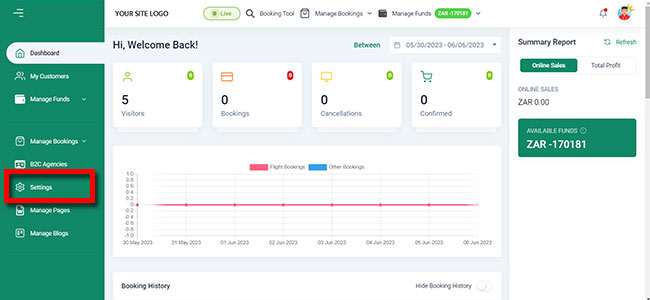
1. Login to your back office and navigate to Settings
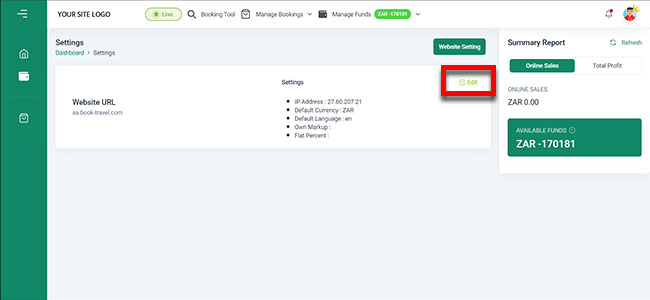
2. Click the Edit button in the right hand side of the box
3. Enter your Settings.
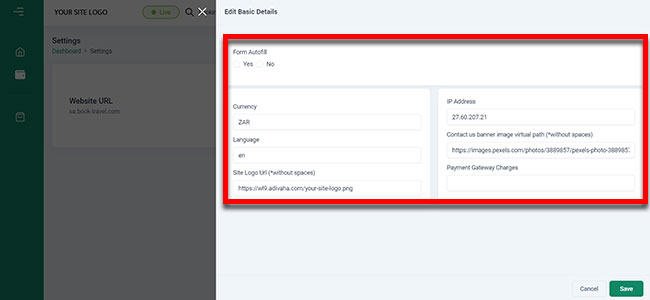
4. Click Save.